La documentación del producto está disponible solo en inglés.
Personal injury overview
Personal injury is a set of case-management tools built for firms that run injury claims: the incident record, the treating providers and their records and bills, the damages you are claiming, the insurance and negotiation history, the deadlines you cannot miss, and the settlement statement that closes the file. It lives inside the matters you already work in, plus a firm-wide workspace for everything that crosses matters.
This page explains what the module gives you, how to turn it on for a matter, who can see what, and what each of the four tabs is for.
Before you begin
- Personal injury is part of the Professional plan. On the Standard plan the module is hidden: the Personal injury group is not in the sidebar and matters do not show the personal injury tabs. Only the firm owner can move the firm to Professional, from Settings > Billing. See Your Esqase subscription.
- Outside the Philippines, your firm owner also accepts an agreement once. Until that is done, the module opens on a Business Associate Agreement required card and nothing can be recorded. A firm registered in the Philippines accepts no agreement: the module opens as soon as the firm is on Professional. See Business associate agreement (BAA).
- Personal injury adds two permission areas to your role, and you may hold one without the other:
- Personal injury covers the case record, damages, insurance policies, the negotiation log, deadlines, and the settlement.
- Medical records and bills covers treating providers, records and bills requests, medical records, bills, payers, and any lien worked out from a bill.
- Both appear in the Personal injury group of a role's permission grid, between Billing and Developers. The group starts collapsed, so open it to see the two rows. See Roles and permissions.
- Firm owners have full access to both. Out of the box, an Administrator and an Attorney get everything; Staff get View on Personal injury and View, Create, and Update on Medical records and bills.
- You also need the ordinary matter permissions. If a matter is restricted to specific members and you are not one of them, nothing on this page opens it for you.
Note: A firm registered in the Philippines runs the same module under Philippine names. It is called Torts and Damages, the matter action reads Track as torts and damages, and the case field is Cause of action. The four tabs keep the names used here. See Torts and damages (Philippines).
Note: If your firm was created before personal injury shipped, the two permissions are granted to roles still named Administrator, Attorney, and Staff. Any custom role your firm invented, or a preset role you renamed, starts with no access at all and has to be granted it by hand under Settings > Roles. This is deliberate: medical records are sensitive, so no role inherits access to them automatically.
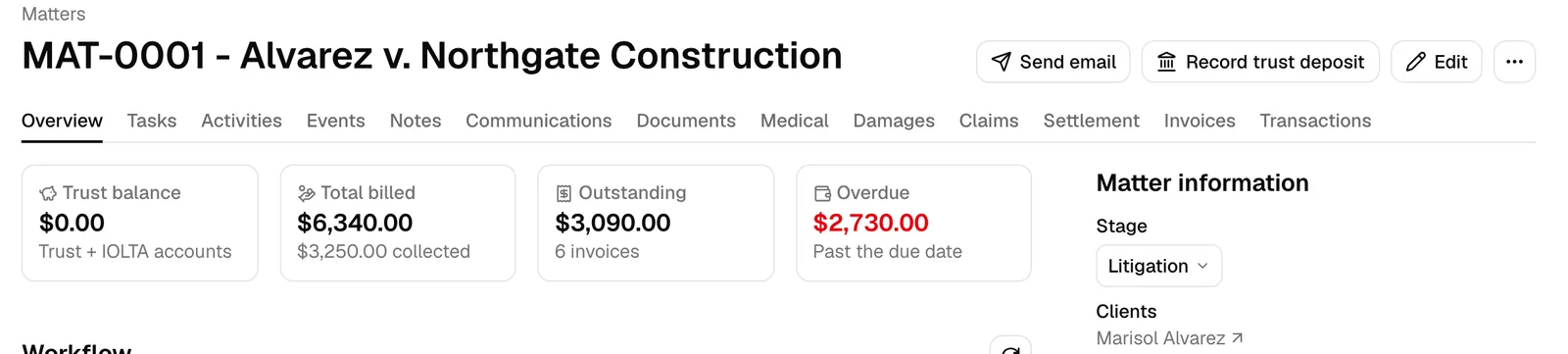
Turn a matter into a personal injury case
A matter shows the personal injury tabs once it is tracked as a personal injury case. There are two ways to get there.
Track an existing matter
- Open the matter.
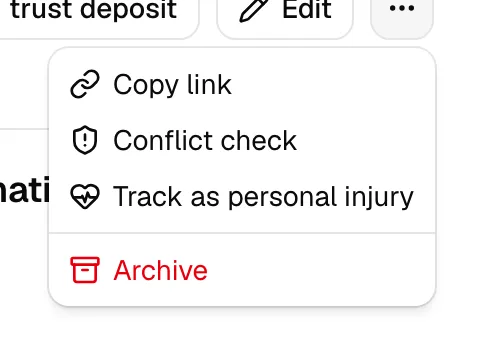
- In the header, click the More actions button (the "..." icon).
- Choose Track as personal injury. It sits below Copy link and Conflict check.
- A short Setting up the personal injury case... message appears, then Matter tracked as personal injury. The four tabs appear straight away.
There is no confirmation step and no undo button. Tracking a matter only adds the case record; it changes nothing about the matter itself, and nothing you already have on it is touched.
The new case starts with sensible defaults you can change at any time on the Medical tab: case type Other, liability Unknown, statement order Fees first, and fee base Gross recovery.
Note: Track as personal injury appears only if your role includes Create access for Personal injury, and only while the matter is still open. It is hidden once the case exists, and hidden on an archived matter.
Open a matter in a personal injury practice area
If the matter's practice area is marked Personal injury, the four tabs appear before you do anything. Each one shows the same short Not tracked as personal injury yet panel with a Track as personal injury button, so you can start the case from whichever tab you happened to open.
A practice area named Personal Injury or Torts and Damages is marked for you when it is added. To treat another practice area the same way, for example "Personal Injury - Auto", turn on its Personal injury switch under Settings > Practice areas (see Practice areas and stages). On a matter in an area that is not marked, use Track as personal injury.
Tip: The first time anyone in your firm tracks a matter as personal injury, Esqase quietly installs the starter pack: five matter field sets, a matter template, a public intake form, and a task list. Nothing tells you it happened, so look under Settings > Personal injury to confirm. See Personal injury settings.
The four tabs
The tabs sit in the matter's tab bar between Documents and Invoices. Each one is a stage of the case rather than a filing cabinet, so you can work left to right as the claim develops.
Medical
Everything about the client's treatment: the incident details card at the top, then one card per treating provider holding that provider's records and bills requests, the medical records you have received, and the bills with whoever has paid part of them. This is where a bill balance becomes a lien on the recovery.
See Medical records and treatment.
Damages
The ledger of every loss you are claiming, typed and totalled, with the medical figures behind it summarised at the top and broken down by provider at the bottom. Export it to a spreadsheet when you build a demand.
See Damages and claims.
Claims
The other side of the case: the insurance policies that could pay, the negotiation log of demands, offers, and counters, and the deadlines the case has to hit, with the statute of limitations shown at the top for reference.
See Damages and claims.
Settlement
Where the money is worked out and paid. Record what came in, what the fee is, what comes off for liens and advanced costs, and what the client takes home. Then plan the disbursement lines, pay each one out of trust, and generate the settlement statement.
See Settlement and disbursement.
Note: All four tabs are hidden from anyone whose role does not include View access for Personal injury. If you land on a link like ?tab=settlement for a matter you cannot see the tab on, or for a matter that is not a personal injury case, you arrive on the matter's Overview tab instead, with no error.
Who can see what
Personal injury holds the most sensitive information in Esqase, so access is decided by two questions, and you need a yes to both.
- Does your role allow it? Personal injury gates the case, damages, claims, deadlines, and settlement. Medical records and bills gates the treatment side. A member with Personal injury but not Medical records and bills sees the incident card and the message "Medical records are not shared with you" where the provider cards would be.
- Can you open the matter? A matter set to be visible only to specific members stays that way here. You cannot reach its treatment, bills, liens, damages, policies, negotiation history, settlement, or deadlines from any personal injury screen unless you are on the matter.
On the firm-wide pages, a matter you are not on is shown as Restricted matter with no number, no title, and no link. The amounts and counts around it are still correct, so your totals never lie, but the matter itself stays confidential. See Restricted matters on billing records for the same idea applied to money.
Important: Update access to Medical records and bills carries real financial weight. Ticking Treat the balance as a lien on the recovery on a bill, or This payer asserts a lien on the recovery on a payer, creates a claim against the settlement that is deducted from the client's share. That is the point of the flag, but it means the medical permission is not a read-and-file permission. Grant it to people you would trust with the money side of the case.
Where the firm-wide pages are
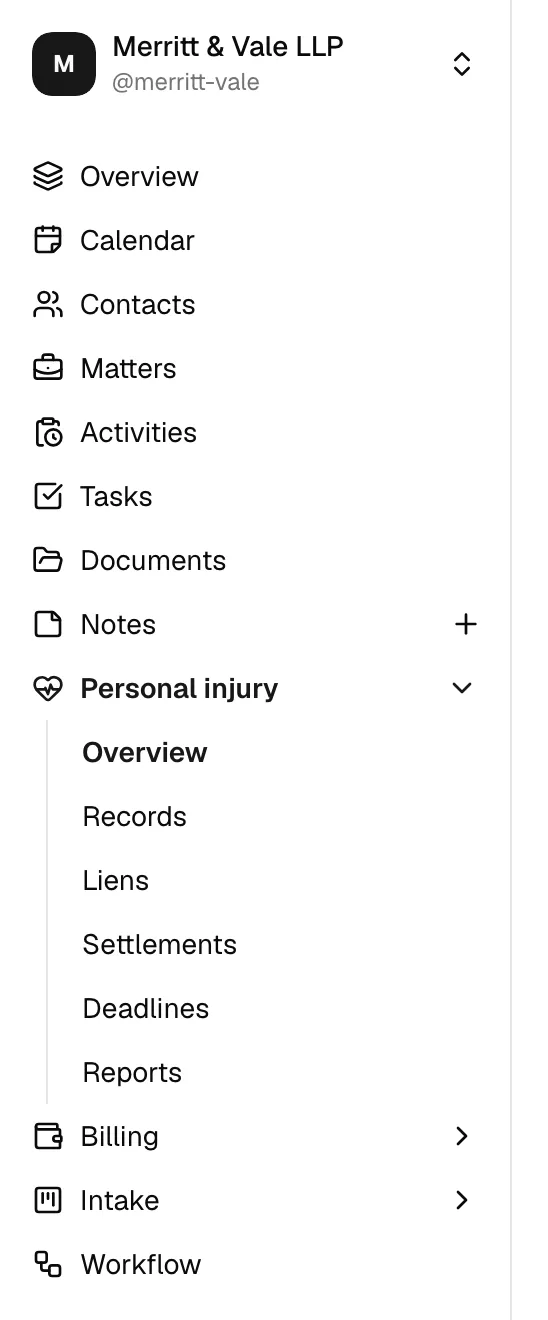
Alongside the per-matter tabs, Personal injury in the sidebar opens a firm-wide workspace: an overview of every open case, a records worklist so nothing sits unchased, a liens register, a settlements list, a deadlines page, and six reports with CSV exports.
See The personal injury workspace and reports.
Reminders you get automatically
Esqase watches five kinds of date for you and sends a notification when one comes due, once per record per date:
- a statute of limitations date approaching,
- a records follow-up due,
- a personal injury deadline due,
- a lien response due,
- a demand response due.
You also get one when a settlement is marked funded. Each notification opens the matter on the right tab. See Notifications.
Common questions
I turned on the tabs by mistake. How do I turn them off? There is no "untrack" button. You can close the case instead: on the Medical tab, click Close case on the incident details card. The case comes out of the open lists and the reports, everything already recorded stays where it is, and Reopen case brings it back.
I can see the Medical tab but not the provider cards. Your role has View on Personal injury but not on Medical records and bills. Ask an administrator to add it.
Why does a colleague see a matter on the liens register that I only see as "Restricted matter"? That matter's visibility is limited to specific members and they are one of them. Ask to be added to the matter; changing your personal injury permissions will not reveal it.
Do my clients see any of this? No. Everything in personal injury is internal. The one thing a client sees is a settlement statement you generate and send them for signature, and a public intake form if you use the one in the starter pack.