La documentación del producto está disponible solo en inglés.
Credit notes, write-offs, and discounts
Once an invoice has gone out to a client, its figures are fixed. You do not go back and edit them. Instead you reduce what the client owes with a discount (before the invoice is issued), a credit note (after it is issued, when you have over-billed or agreed a reduction), or a write-off (when the balance is simply not going to be collected). This page covers all three, plus the late fees Esqase can add to overdue invoices.
Before you begin
- Permission. Discounts are part of building an invoice, so they need Edit access for invoices. Credit notes need Create access for credit notes. Write-offs need Edit access for invoices. Firm owners and administrators have full access by default, attorneys can create and edit credit notes, and staff have none until you grant it. See Roles and permissions.
- Late fees are a firm-wide setting. They are switched on once for the whole firm, not per invoice. See Invoice and billing settings.
Apply a discount to an invoice
A discount is applied while you are building the invoice, so the client sees a reduced total from the start.
- Create or edit an invoice. See Creating and sending invoices.
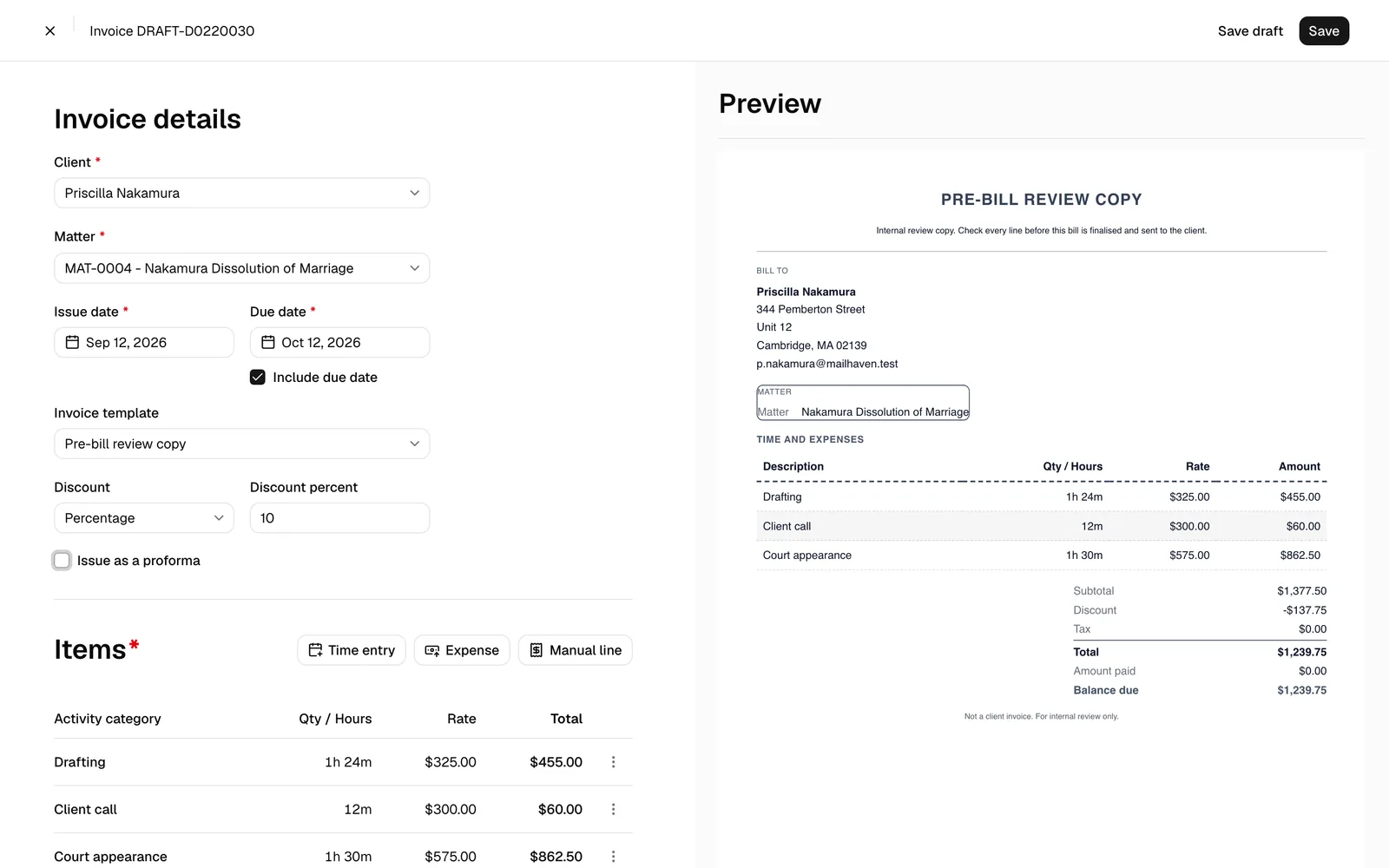
- In the invoice details panel, tick Apply a discount. The Discount type field appears, set to Percentage. Keep it or change it:
- Percentage. A percentage off the invoice, entered in Discount percent. It cannot be more than 100.
- Fixed amount. A flat amount off the invoice, entered in Discount amount.
- Enter the value. A discount with no value is rejected with Enter a discount amount or clear the discount, so either fill in the value or untick Apply a discount. Unticking it removes the discount and clears its value.
- The totals panel on the right updates as you type, showing the discount as a negative line between the subtotal and tax.
- Save the invoice.
Note: The discount applies to the invoice as a whole. It comes off the subtotal, and the tax is reduced in the same proportion, so the client is not charged tax on the amount you took off. It shows as its own negative line between the subtotal and tax wherever the totals appear: the editor's preview, the invoice PDF, the Total bill figure on the invoice page, and the client's payment page and the PDF they download from it. That way the client can see what they were given.
Issue a credit note
A credit note reduces the balance of an invoice that has already been issued. It is the correct way to fix an over-billing, honour a goodwill reduction, or record a bad debt, because the original invoice stays exactly as the client received it and the credit is a separate, numbered document.
- Open the invoice from Invoices.
- Click the ... button in the top-right action row, then Issue credit note.
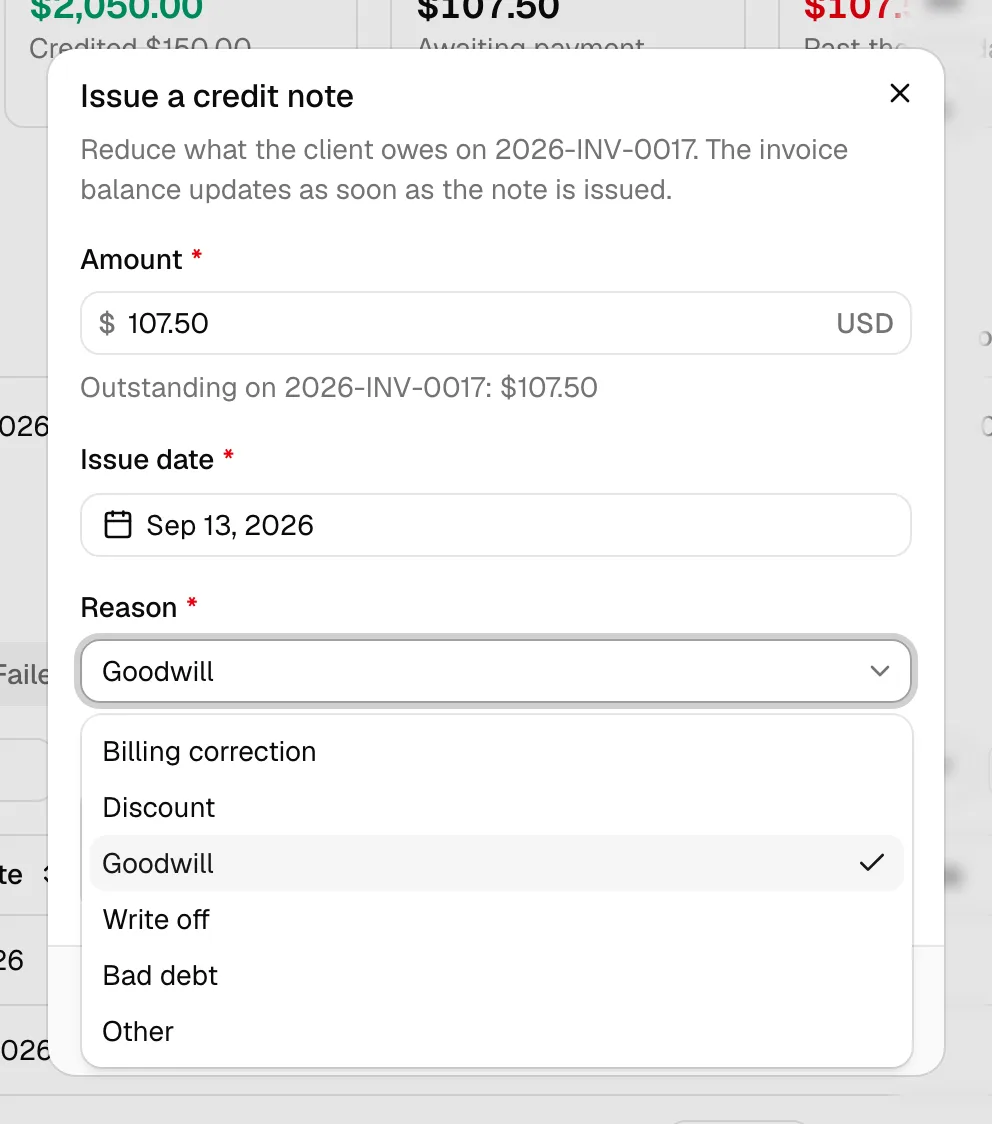
- Fill in the dialog:
- Amount. How much to credit. The field description shows the invoice's outstanding balance, and the credit cannot exceed it.
- Issue date. Defaults to today.
- Reason. One of Billing correction, Discount, Goodwill, Write off, Bad debt, or Other.
- Note. What is being credited and why. Worth filling in: this is what the next person reads.
- Click Issue credit note.
The credit note takes the next number in your firm's credit-note sequence (CN-0001, CN-0002, and so on), and the invoice balance drops immediately. A Credit notes table appears on the invoice showing the number, issue date, reason, status, and amount.
Important: Issue credit note only appears on an invoice that has been issued and still has an outstanding balance. On a draft, edit the invoice instead. If you try to credit more than is outstanding, Esqase refuses with "The credit cannot be more than the outstanding balance on the invoice".
Note: The credit-note sequence is separate from your invoice numbering and is not configurable.
Void a credit note
If a credit note was issued in error:
- Open the invoice and find the note in the Credit notes table.
- Click the void button at the end of its row (labelled Void followed by the credit note number).
The credit is reversed and the invoice balance goes back up by that amount. The note stays on the invoice with the status Voided, so the trail of what happened is preserved. A note that has already been voided cannot be voided again.
Write off an invoice
Writing off says the balance will not be collected. Use it for a client who has stopped paying, or a balance too small to chase.
- Open the invoice.
- Click ..., then Write off.
- Fill in the dialog:
- Amount. Defaults to the whole outstanding balance. Lower it for a partial write-off. It cannot be more than what is outstanding.
- Reason. Why the balance is no longer collectible. This is required.
- Click to confirm.
The written-off amount comes off the balance. When the whole balance is written off, the invoice status becomes Written off.
Important: Write off only appears while an invoice is Pending or Partially paid and still has an outstanding balance. A paid invoice has nothing to write off, and a refunded one should be credited instead.
Tip: A credit note and a write-off both reduce the balance, but they mean different things to your accountant. A credit note says "we should not have billed this". A write-off says "we billed it correctly and will not be paid". The realization report reports the two separately. See Financial reports and exports.
Late fees on overdue invoices
Esqase can add a late fee to invoices that pass their due date. It is a firm-wide policy, checked once a day.
To switch it on, go to Settings, Firm, Invoices, and use the Late fees section. You set:
- whether to charge a late fee at all,
- Fee type, either Percentage of the balance or Fixed amount,
- the percentage or amount,
- a Grace period in days after the due date before the fee applies, and
- whether to charge the fee once per invoice or every month.
See Invoice and billing settings for the full walkthrough.
Once the policy applies to an invoice, the fee is added to the invoice total and shows on the invoice as a late fee. Nothing is charged to a card: the fee increases what the client owes, and they pay it with the rest of the balance.
Note: A late fee needs a due date to work from. An invoice saved without Include due date ticked is never charged a late fee, and never sends a payment reminder either.
Common questions
Can I edit an invoice instead of crediting it? Only while it is a draft or in review. Once it has been issued, the figures are locked and a credit note is the way to change what is owed.
Does a credit note produce its own PDF for the client? Not today. The credit shows on the invoice, and the invoice PDF reflects the reduced balance.
Does a write-off delete the invoice? No. The invoice stays, with the written-off amount recorded against it, and it shows in the realization report so your collection figures stay honest.
Can I delete an invoice that has been credited or written off? No. Once money has been recorded against an invoice, whether paid, credited, or written off, the invoice can no longer be archived or deleted.