La documentación del producto está disponible solo en inglés.
Trust compliance and three-way reconciliation
Money held in trust belongs to the client until it is earned or paid out. Bar rules in most places require you to be able to prove, at any moment, that the bank balance, your own ledger, and the sum of every client's individual balance all agree. This page covers the tools Esqase gives you to do that: paying money out of trust, moving it between trust accounts, the guard that stops a client ledger going negative, and the three-way reconciliation report.
Before you begin
- Permission. Recording a disbursement or a trust transfer needs Create access for transactions. The trust ledger and three-way reports need View access for both accounts and transactions. The reconciliation history on the three-way report needs View access for Reconciliations on top of that. See Roles and permissions.
- An active trust account. Trust actions only appear on accounts whose type is trust, IOLTA, client trust, or escrow. See Accounts, trust, and transactions.
Note: Esqase tracks a client ledger inside every trust account. The account holds one pooled balance at the bank, but Esqase always knows how much of that pool belongs to each client, because every trust entry names a client and a matter.
Pay money out of trust (a disbursement)
Use this when you pay a client's money to somebody: a court fee, an expert, a settlement, or the client themselves.
- In the sidebar, open Billing, then Accounts, and click the trust account.
- Click the ... button in the top right, then Record disbursement.
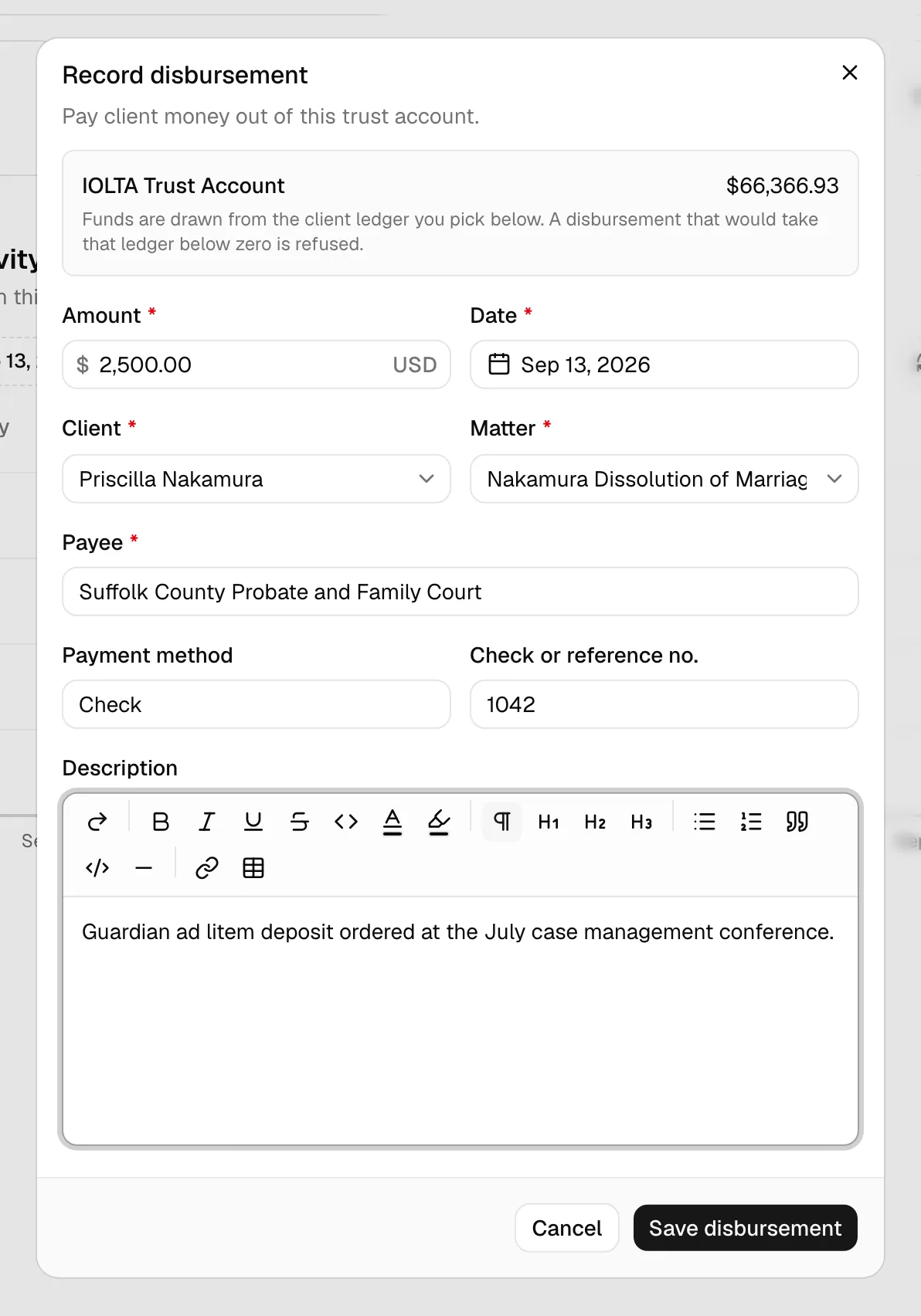
- Fill in the dialog:
- Amount. How much leaves the account.
- Date. Defaults to today. It cannot be in the future.
- Client. Whose money this is. Search by name.
- Matter. Which of that client's matters the money is held under. You must pick a client first.
- Payee. Who is being paid. This is required, because a trust disbursement has to name its recipient.
- Payment method. Optional free text, for example "Check" or "Wire".
- Check or reference no. Optional, but worth filling in so the entry is easy to find when you reconcile.
- Description. Optional notes.
- Click Record disbursement.
The money is withdrawn from the trust account and taken off that client's ledger. The panel at the top of the dialog reminds you that funds are drawn from the client ledger you pick, not from the account as a whole.
Important: If the disbursement would take that client's ledger below zero, Esqase refuses it and tells you so. This is deliberate: paying out one client's money to cover another client's shortfall is a trust-accounting violation, and Esqase will not record it, even if the account as a whole has enough money in it.
Move funds between trust accounts
Use this when a client's funds need to sit in a different trust account, for example when you move an old retainer into the account you use for a new matter.
- Open the trust account holding the funds.
- Click ..., then Transfer to another trust account.
- Fill in the dialog:
- From account. Fixed to the account you opened.
- To account. Another active trust account. It has to be a different account.
- Amount and Date.
- Client and Matter. Both sides of the transfer stay attributed to this client, so their ledger total does not change, only where it is held.
- Check or reference no. and Description. Optional.
- Click Record transfer.
Esqase writes both legs at once: money out of the first account and into the second, both on the same client's ledger.
Note: Moving trust money to your operating account because you have earned it is a different action. That is a trust-transfer payment, recorded against the invoice it pays. See Recording and managing payments.
The negative-balance guard
Esqase refuses any entry that would drive a client's trust ledger, or a trust account itself, below zero. The guard covers every path that can move trust money:
- recording a payment that draws on trust,
- refunding a payment back out of trust,
- clearing a client's reported payment,
- a disbursement or a transfer,
- voiding an entry, when the void is what would create the shortfall,
- a reversal that LawPay or Confido Legal reports, such as a returned bank payment or a chargeback on money that went into trust.
When it fires you get a plain message saying the entry would take the trust balance below zero and was not recorded. Nothing is written. Check the client's balance on the account's Clients tab, then lower the amount or pick the right client.
Tip: Because the guard runs on the result of the write rather than on a stale reading, two people saving at the same moment cannot slip a negative balance through between them.
Read the trust ledger report
The trust ledger report shows one row per client in a trust account, so you can see at a glance whose money you are holding.
- Go to the Trust ledger report under Billing reports. See Financial reports and exports for how to reach the reports area.
- Pick the trust account and an as of date.
Five figures sit above the table:
- Book balance. What the ledger says the account held on that date.
- Sum of client ledgers. Every client's balance added together.
- Clients in overdraft. How many clients hold a negative balance in this account, with the lowest of those balances named underneath. This should always be zero, and the card turns red when it is not.
- Held without a client. Money in the account that no client is attached to. This should be zero. Anything else means an entry was recorded without naming a client.
- Unreconciled entries. How many posted entries have not been matched to a bank statement.
The table beneath lists each client with their Balance, Deposits, Withdrawals, Entries, and Last activity. Use the search box above it to find a client by name, and click Export by client to download the whole table.
Important: If Held without a client is not zero, fix it before you certify anything. Find the entries on the account's Transactions tab, and re-record them with the client and matter set.
Important: If Clients in overdraft is not zero, treat it as urgent. A client whose trust ledger has gone below zero has been paid out of money that belongs to somebody else, which is the failure most bar rules are written to prevent. The negative-balance guard above is meant to make this impossible, so a count above zero points at a balance that predates the guard or an entry recorded outside it. Open the account's Clients tab, find the client, and work back through their entries until you find the one that should not be there.
Run a three-way reconciliation
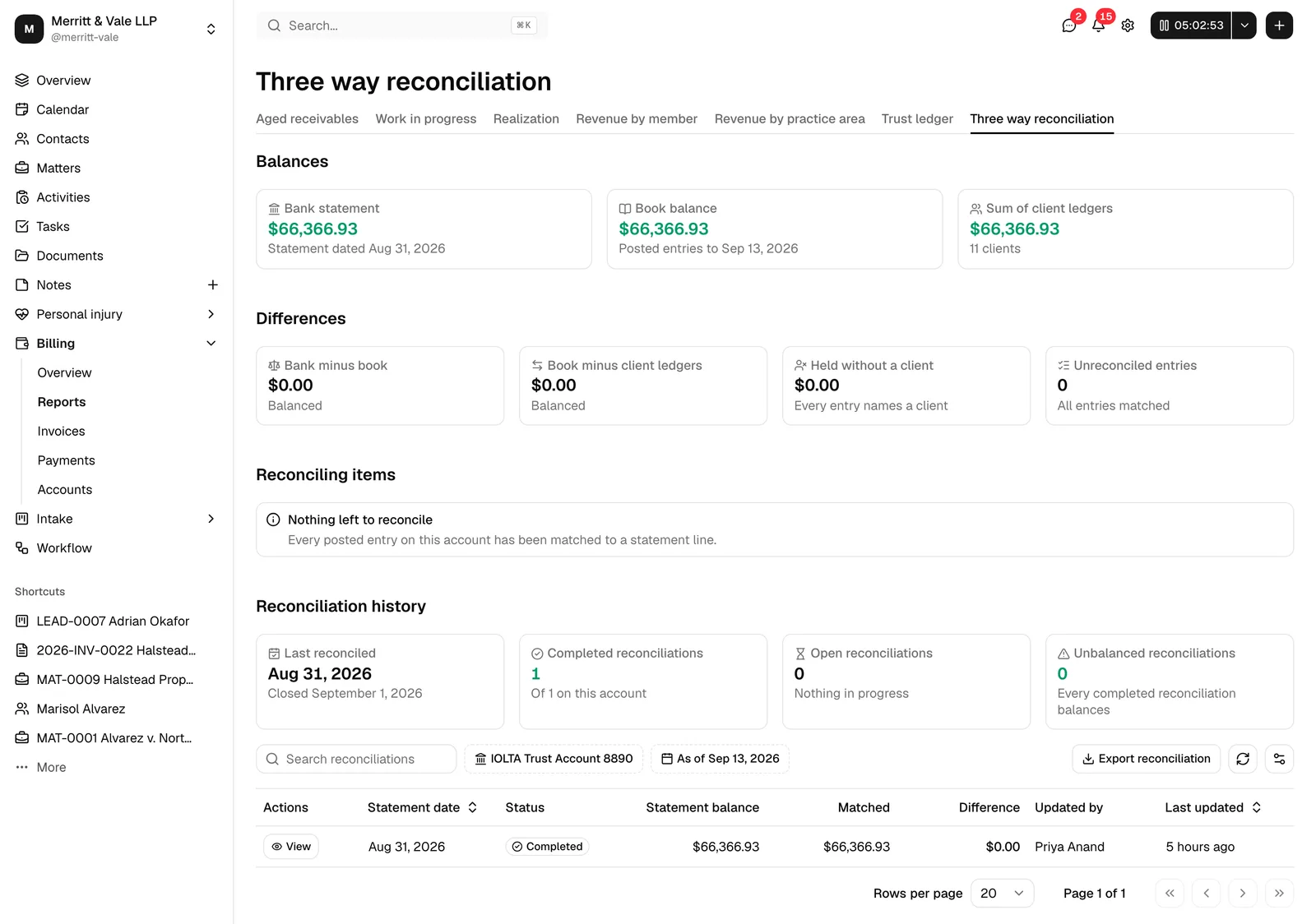
A three-way reconciliation compares the three numbers that must agree: what the bank says, what your ledger says, and what your clients' individual balances add up to.
- Go to the Three way reconciliation report under Billing reports.
- Pick the trust Account and the As of date. This is normally the closing date of the bank statement you just reconciled. Both filters sit on the toolbar above the table, next to the search box.
Balances shows the three figures:
| Figure | Where it comes from |
|---|---|
| Bank statement | The closing balance from the most recent completed reconciliation covering that date. |
| Book balance | Posted ledger entries up to that date. |
| Sum of client ledgers | Every client's balance in that account added together. |
Differences shows what does or does not line up:
- Bank minus book. Should be explained entirely by the reconciling items below (deposits in transit and withdrawals that have not cleared).
- Book minus client ledgers. Should be zero. Anything else means an entry in the account does not name a client.
- Held without a client. The same problem, shown as an amount.
- Unreconciled entries. How many entries are still unmatched.
Reconciling items breaks the unmatched entries into Deposits in transit, Outstanding withdrawals, and the Net unreconciled figure, with the date of the oldest one.
Click Export reconciliation to keep a copy for your file. It sits on the table toolbar, next to the refresh and column controls.
Important: If Bank statement reads "Not reconciled", no completed reconciliation covers your chosen date. Use the Reconcile this account button in the page header, top right, to run one first. Without it, the report can compare only two of the three numbers. See Reconciling bank and trust accounts.
Check the reconciliation history
The three numbers above only mean something if the account is actually being reconciled, and if those reconciliations balanced. Reconciliation history, the last group of cards on the report, answers that:
- Last reconciled. The statement date of the most recent completed reconciliation, with when it was closed underneath. It reads Never in red, with Not yet reconciled underneath, when the account has never been reconciled at all.
- Completed reconciliations. How many have been completed. The line underneath names the set the count was taken from.
- Open reconciliations. How many are still Draft or In progress, with the oldest of their statement dates underneath, or "Nothing in progress" when there are none.
- Unbalanced reconciliations. How many completed reconciliations are carrying a difference that is not zero. It should be zero, and the card turns red the moment it is not.
Underneath the cards, a table lists that account's reconciliations, newest statement first, with the same columns as the account's own Reconcile tab: Statement date, Status, Statement balance, Matched, Difference, Updated by, and Last updated. Click View on a row to open that reconciliation and look at the entries behind it. Use the search box on the toolbar to find one by statement date, status, or the member who last changed it, and use the Statement date or Last updated column heading to sort. If the account has never been reconciled, a No reconciliations yet panel takes the place of the table, with a Reconcile this account button that opens the account's Reconcile tab and a Learn more link to Reconciling bank and trust accounts.
Important: If Unbalanced reconciliations is not zero, treat it as a compliance problem rather than a display quirk. Esqase refuses to complete a reconciliation while its difference is anything but zero, so a count above zero means something moved after the reconciliation was closed. Click View on the row whose Difference is red, reopen it, and work the difference back to zero. See Reconciling bank and trust accounts.
Important: These four cards and the search box cover the 100 most recent reconciliations on the account, not necessarily all of them. When there are more, the toolbar says so in plain words, for example "Search covers the 100 most recent reconciliations, not all 214." Last reconciled is right either way, because the list loads newest first. For the other three, read the line under Completed reconciliations: it says "Of 43 on this account" when the whole history is loaded, and "Of the 100 most recent" when it is not.
Note: Seeing billing reports and seeing reconciliations are separate permissions. If your role includes the first but not the second, the balances, differences, and reconciling items still appear, and a panel headed Reconciliation history is not available, with the reason underneath, takes the place of these cards and the table.
Online payments and trust
When your firm takes card and bank payments through LawPay or Confido Legal, the processor keeps trust money apart from operating money in the same way Esqase does. See Taking card and bank payments with LawPay or Confido Legal.
- Invoice payments never land in trust. A client paying an invoice by card or bank account is charged to the processor's operating account, and the payment is posted to the Esqase operating or savings account you mapped to it.
- Trust deposits land only in trust. A trust deposit request is charged only to a processor trust account mapped to the same Esqase trust account as your default trust account, never to an operating account, and the deposit is posted to that Esqase trust account under the client (and matter) named on the request. A bank payment is held as pending, and does not count toward the client's trust balance, until it clears. See Trust deposit requests.
- Processing fees never touch trust. Both processors deposit the full amount of each payment and take their fees from your operating account, usually as one debit a month. Esqase records the full payment, and your firm records the fee debit as a withdrawal on the operating account. See Record a deposit or withdrawal.
- Map trust to trust. On the Processor tab, a processor's trust account can only be mapped to a Trust Account, IOLTA, Client Trust Account, or Escrow account, and an operating account only to an operating or savings account, so a mapping can never mix the two.
- Reversals respect the guard. If the processor reverses money that is held in trust, for example a returned bank payment, and applying it would take a client's trust ledger below zero, Esqase does not apply it. The processor's Recent activity shows a row that Needs attention, and you record the reversal by hand once the trust balance allows it.
Low trust balance reminders
Esqase can email your firm when a client's balance in a trust account falls below a minimum you have set for their matter, so you can ask for a replenishment before you run out of funds to work against. The reminder repeats at most once a week per matter for as long as the balance stays low.
Note: There is no field for the minimum trust balance on the matter screen yet, so this reminder does not fire for any matter today. Until that field arrives, watch the balances yourself on the trust account's Clients tab or in the trust ledger report. See Financial reports and exports.
Common questions
Why can I not disburse when the account clearly has the money? The account has the money, but the client you picked does not. Trust money is not fungible between clients. Check the client's balance on the account's Clients tab.
Does a void undo a trust entry? Voiding removes the entry's effect on the balance. If the void itself would push a client's ledger negative, it is refused, and you will need to correct the entries in a different order.
What date should I use for the three-way report? Use the closing date of the bank statement you last reconciled. That is the only date on which all three numbers can be compared against real evidence.
Where do I see the whole ledger for one client? Open the trust account and use the Clients tab, or open the contact and look at their transactions. See Accounts, trust, and transactions.