La documentación del producto está disponible solo en inglés.
Business associate agreement (BAA)
Personal injury records hold health information about your clients, so a firm on the Professional plan outside the Philippines agrees in writing to how Esqase may handle that information before it records the first case. Your firm owner reads and accepts the Business Associate Agreement, once, inside Esqase. Accepting it also switches on three protections for everyone at the firm.
Note: This is an agreement between your firm and Esqase. It is separate from the Terms of Service your firm accepted at signup, and separate from anything you sign with your own clients.
Note: A firm registered in the Philippines accepts no agreement. On Professional, Torts and Damages opens straight away, and nothing on this page applies to it. See Torts and Damages in the Philippines.
Before you begin
- Only the firm owner can accept. Every other member sees the same card with a line asking the owner to accept it, and no buttons. See Managing firm members.
- Your firm has to be on the Professional plan. On Standard there is nothing to accept, because personal injury is not in the plan. See Your Esqase subscription.
- Your firm's registered country decides whether you need it. A firm registered in the Philippines needs no agreement. Every other firm, the United States included, accepts the Business Associate Agreement. Your country is set on your firm profile and is shown to you again before you accept. See Your firm profile and details.
- Nothing else in Esqase waits on this. Only personal injury is held behind it.

Where the agreement appears
Click Personal injury in the sidebar. Until the agreement is accepted, you get one full-width card instead of the module:
- The title reads Business Associate Agreement required.
- The firm owner sees a short explanation of what the records are, what the agreement covers, and what accepting turns on, plus two buttons: Read and accept, and Open the published version (which opens the same agreement on the Esqase website in a new tab).
- Everyone else sees the explanation and a line asking them to have the firm owner accept it.
Your matters do not show the Medical, Damages, Claims, and Settlement tabs either, so the card is the one place the agreement is offered. Until it is accepted, nothing personal injury can be saved anywhere. That is enforced when a record is written, not only on the screen.
Accept the agreement
You need to be the firm owner.
- Click Personal injury in the sidebar, then click Read and accept on the card.
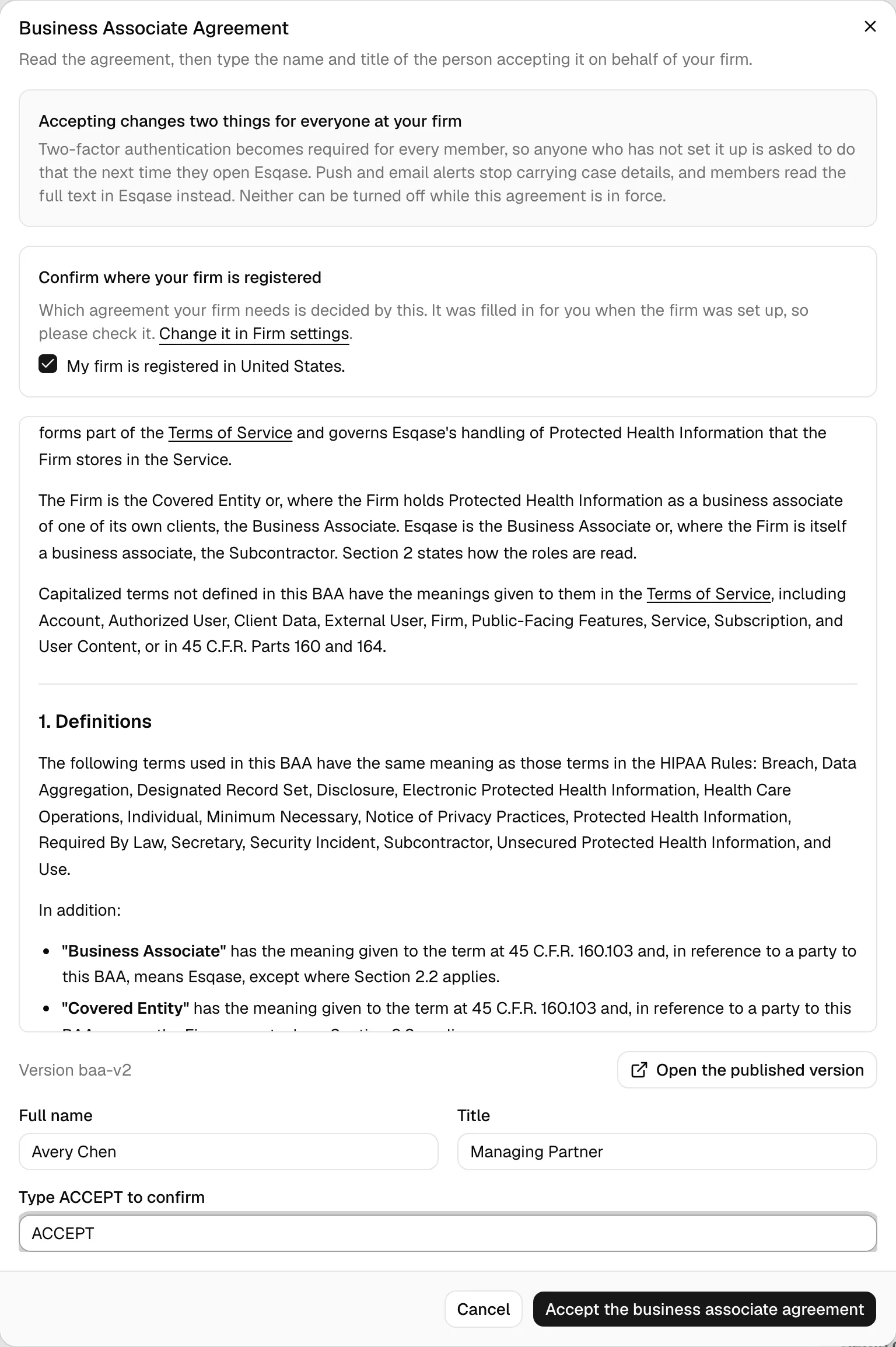
- The agreement opens in a dialog. Read the panel at the top, Accepting changes two things for everyone at your firm, which explains the two controls that switch on the moment you accept.
- Under Confirm where your firm is registered, tick the box that names your country, for example "My firm is registered in the United States." Whether your firm needs the agreement is decided by this, so check it against your records. If it is wrong, follow the Change it in Firm settings link, correct the country, then come back and start again. If your firm has no country recorded, the box instead says that you have no registered country set and accept the agreement anyway.
- Read the agreement in the scrolling panel. The version you are accepting is shown underneath it. Open the published version opens the same text on the Esqase website if you would rather read it full width or send it to your own counsel first.
- Enter the Full name and Title of the person accepting on behalf of the firm.
- Type ACCEPT in the confirmation box. The accept button stays disabled until the country box is ticked, both fields are filled in, and the word matches.
- Click Accept the business associate agreement. Esqase confirms with Business Associate Agreement accepted and the module opens.
Esqase records who accepted it, the name and title they typed, the date and time, the exact version of the document, and the network address and browser used. That record is written to your firm's audit trail. See Activity log and audit trail.
What accepting turns on
Three things change for the whole firm at the moment the agreement is accepted. None of them can be switched off while the agreement is in force.
1. Two-factor authentication becomes required
Every member of the firm has to use two-factor authentication. Anyone who has not set it up is taken to the setup screen the next time they open Esqase, with the line "Your firm requires two-factor authentication. Set it up to continue." There is no Skip on that screen while it is required, and they cannot reach the dashboard, settings, or any other firm screen until they finish.
Members also cannot turn their own two-factor authentication off while the firm requires it. The Turn off button is still on their security page, but using it returns "Your firm requires two-factor authentication, so it cannot be turned off. Ask your firm owner if this needs to change."
The firm-wide switch under Settings > Firm is locked on, with the line "Required while your firm's business associate agreement is in force". See Two-factor authentication (2FA).
2. Push and email alerts stop carrying case details
Notifications that leave Esqase say what kind of thing happened and nothing more. A desktop alert reads Task assigned and Open Esqase to see it. A notification email arrives with the subject Task assigned on Esqase and says the same inside. Neither ever names the client, matter, document, or provider. Notification and billing emails drop your firm name too. This covers every alert that leaves the window, including the one Esqase raises itself while your tab is in the background.
Your clients are covered on the same terms: a portal client's desktop alert and notification email read the kind of event and Open your client portal to see it., and the email's subject names only the event and Esqase, for example Payment received on Esqase. Their portal inbox still shows the full text. Alerts on a client's phone from the Esqase Client app carry no detail with or without an agreement: they read the kind of event and Open Esqase to see it.
The notifications list inside Esqase is unchanged: the bell, the Notifications page, and the corner messages all still show the full title and body. See Notifications.
3. AI document indexing is turned off
The firm-wide AI document indexing setting is switched off, so no new or updated document is read to build a summary or a search index. Your firm turns it back on deliberately, and personal injury cases stay opted out until someone opts each one in.
On each personal injury case, the Medical tab's Incident details card carries a Let Esqase read documents on this case switch. It is off by default on personal injury matters. Turning it on lets the documents on that case be analyzed so your team can search what is in them.
Important: Turning the firm-wide setting back on does not turn on any personal injury case. Each case is opted in on its own, by someone with Update access for personal injury.
Note: Accepting the agreement also turns the AI Assistant off and stops members' personal API keys from being used. A firm owner, or a member with Update access for Assistant settings, can turn the assistant back on from the Firm AI Assistant card in the Firm section of Settings after confirming your firm's agreement with the AI provider. Personal injury matters stay out of the assistant either way. See AI Assistant.
When the agreement is updated
If Esqase changes the text of the agreement, your firm accepts the new version before it can carry on recording personal injury. The same card comes back, this time titled Business Associate Agreement updated, the owner's button reads Read and accept the update, and the description says the agreement your firm accepted has been updated and needs to be read and accepted again.
Accepting the update files the earlier acceptance rather than replacing it, so what your firm agreed to and when stays on record.
If your firm's registered country is corrected to the Philippines, the agreement is no longer needed and the module opens without it. If it is corrected from the Philippines to any other country, Esqase asks for the Business Associate Agreement before personal injury can be recorded again.
Where to see it afterwards
Go to Settings, then Firm. The firm owner sees two read-only reminders under the profile fields:
- Security shows Require two-factor authentication switched on and locked, with the reason underneath.
- Notifications shows Content-free notifications with an On badge and the same "Required while your firm's ... is in force" line, naming the agreement your firm holds.
The published version of the Business Associate Agreement is on the Esqase website at esqase.com/business-associate-agreement.
Common questions
Does a firm in the Philippines accept an agreement? No. Torts and Damages opens as soon as the firm is on Professional.
We are not in the United States. Do we still accept it? Yes. Every firm outside the Philippines accepts the Business Associate Agreement. Confirm your registered country in the dialog before you accept, and talk to your own counsel if your jurisdiction needs something different.
Can I turn two-factor authentication or content-free alerts back off? Not while the agreement is in force. They are part of what the agreement commits your firm and Esqase to.
What happens to the agreement if we move back to Standard? It stays on record, and so do the two controls. Moving to Standard hides the module; it does not undo what your firm agreed to.
Does accepting delete or change anything? No. It records the acceptance and switches on the three protections above. Nothing your firm has entered is touched.