Introduction to Esqase
Esqase is an all-in-one case-management platform for law firms. It brings your contacts, matters, tasks, time entries, billing, documents, intake, and automations into a single workspace, and it gives your clients clean, branded experiences for booking meetings, filling out forms, paying invoices, and signing documents. This page is your orientation to the whole product, so you know what lives where and where to go next.
What Esqase is and who it is for
Esqase is built for everyone at a law firm:
- Attorneys and paralegals track matters, log billable time, manage tasks, and produce documents.
- Billing and accounting staff create invoices, record payments, and reconcile trust and operating accounts.
- Firm owners and administrators invite members, set roles and permissions, manage the firm profile, and oversee the subscription.
- Intake and front-office staff capture leads, run conflict checks, send intake forms, and convert new clients into matters.
Instead of stitching together separate tools for your calendar, your billing, your document drafting, and your client communications, Esqase keeps them in one place and connects them. A time entry you log on a matter flows straight onto an invoice. A booking a client makes online becomes a lead in your pipeline. A signed document is sealed and filed back against the matter automatically.
Note: Esqase is multi-firm aware. One sign-in can belong to more than one firm, and you switch between them from inside the app. See Joining a firm (accepting an invite).
The big picture: one workspace for your whole practice
When you sign in to the Esqase dashboard, a left sidebar organizes everything your firm does. The top group covers your day-to-day work:
- Overview is your landing dashboard with billing trends and lists of upcoming events, open tasks, and outstanding invoices.
- Calendar shows your events, bookings, and task due dates.
- Contacts is your central directory of people and organizations.
- Matters holds your active and closed cases.
- Activities is where you log billable time and expenses.
- Tasks is your firm's to-do board.
- Documents is your drafting and file workspace.
A second group covers your back office and growth:
- Billing expands to Overview, Invoices, Payments, and Accounts.
- Intake expands to Overview, Leads, Forms, and Event types.
- Workflow holds the automations that move new matters and leads along.
Firm-wide settings (your firm profile, members, roles, custom fields, templates, integrations, and your subscription) live in a separate Settings area.
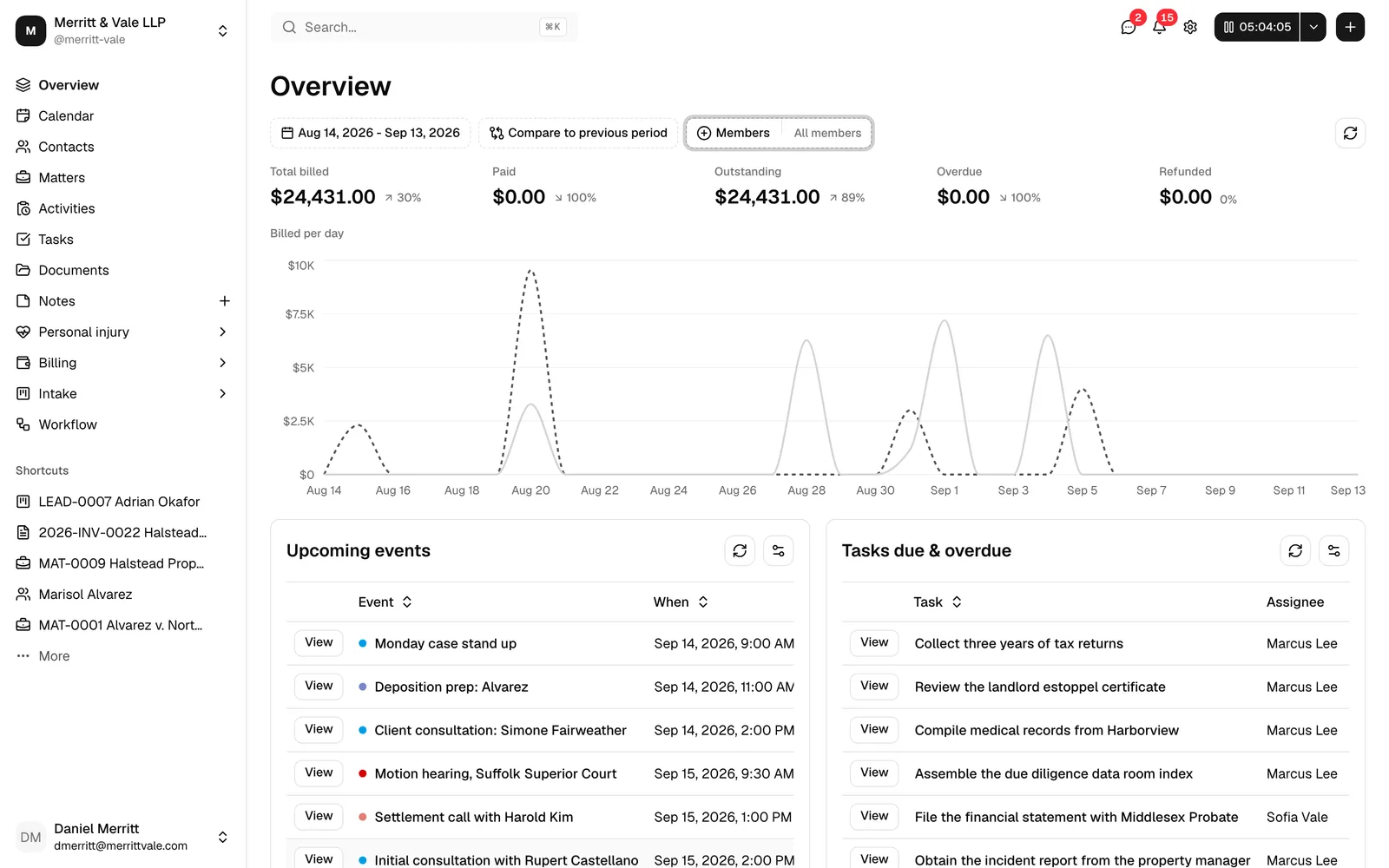
Note: What you see in the sidebar depends on your role. If your role does not include view access to an area (for example, Billing), that item is hidden. See Roles and permissions.
For a guided tour of the interface, see Navigating the dashboard.
The firm dashboard plus four client-facing experiences
Esqase has two sides.
The firm dashboard is the private workspace where your team does its work. It is where you and your colleagues sign in and spend your day.
The client-facing experiences are the polished, public-facing surfaces your clients and prospects use. You configure them from inside the dashboard, and your clients reach them through links you share. There are four:
- Booking. Prospects and clients pick a time and book a meeting on your firm's online scheduling page. See How clients book meetings.
- Intake forms. New clients answer your questions in a clean, mobile-friendly form, and their answers create a lead in your pipeline. See How clients fill intake forms.
- Payments. Clients open a secure payment link and pay an invoice by card or other supported methods. See How clients pay invoices.
- eSignature. Clients open a secure link, review a document, and sign it. Esqase seals the finished document and files it back against the matter. See How clients sign documents.
You never have to manage these surfaces as separate apps. You build a form, an event type, an invoice, or a signature request inside the dashboard, and Esqase generates the client-facing link for you.
Tip: Clients can also view documents you share with them through a secure, read-only link without signing anything. See How clients view shared documents.
Core concepts a new user should understand
A handful of concepts show up everywhere in Esqase. Here is a one-line definition of each, with a link to the page that covers it in depth.
-
Firm. Your law firm's account and workspace. Everything you create (contacts, matters, invoices, templates) belongs to a firm, and your data is kept private to that firm. See Your firm profile and details.
-
Members and roles. Members are the people at your firm with access to the dashboard. Each member has a role (such as Owner, Administrator, Attorney, or Staff) that controls what they can see and do. See Managing firm members and Roles and permissions.
-
Contacts. The people and organizations your firm works with, including clients, opposing parties, and related parties. Contacts are reused across matters, invoices, and communications. See Working with contacts.
-
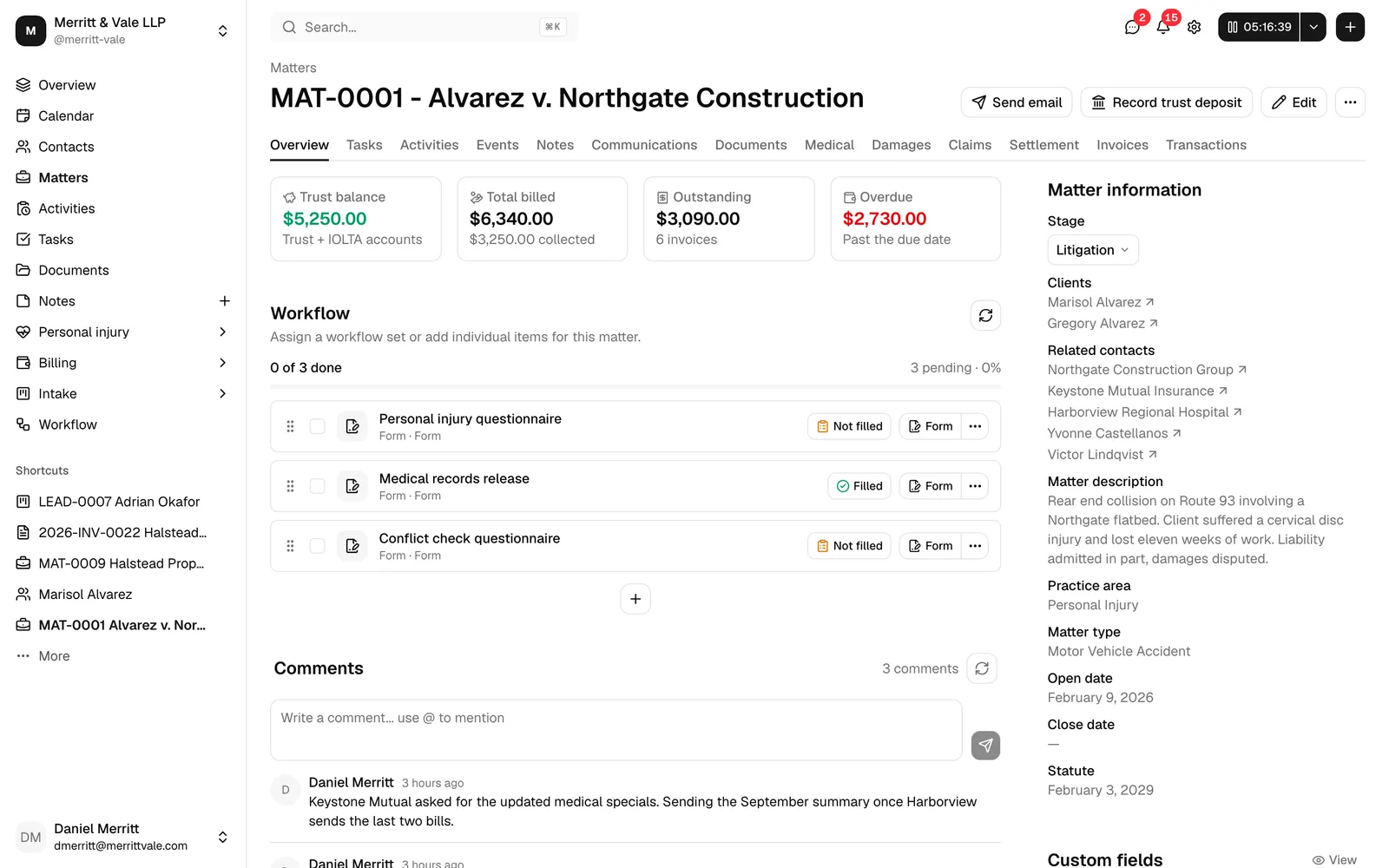
Matters. A matter is a single legal case or engagement. It is the hub that ties together the clients, tasks, time entries, documents, notes, events, and invoices for that piece of work. See Browsing matters and The matter workspace.
-
Leads. A lead is a potential client or new piece of work that has not yet become a matter. Leads move through your intake pipeline, and you can convert a qualified lead into a matter. See Managing leads and Converting a lead to a matter.
-
Activities. An activity is a record of billable (or non-billable) work, either time you spent or an expense you incurred on a matter. Activities are what you turn into line items on an invoice. See Time and expense tracking.
-
Invoices. An invoice is a bill you send to a client, built from activities and other charges on a matter. Once sent, a client can pay it through a secure payment link. See Creating and sending invoices.
-
Workflows. A workflow is a reusable sequence of steps (such as tasks, emails, forms, and scheduling requests) that you attach to a lead or matter to automate your intake and onboarding process. See Workflows and the builder.
Tip: Two more concepts are worth knowing early. A trust account (sometimes called an IOLTA account) holds client money you have not yet earned, kept separate from your firm's own operating funds; see Accounts, trust, and transactions. Custom fields let you add your own fields to contacts, matters, and leads so Esqase matches the way your firm works; see Custom fields.
Where to go next
You do not need to learn everything at once. Start by getting your firm set up, then explore each area as you need it.
- Set up your firm. Follow the Quickstart: set up your firm to create your firm profile, invite your team, and connect the essentials.
- Learn the interface. Read Navigating the dashboard to get comfortable moving around.
- Work the Setup Guide. The built-in checklist walks you through first-run tasks; see Using the Setup Guide.