Deleting your Esqase client account
You can delete your Esqase client account yourself, in the Esqase Client app by Esqase, Inc. or in the client portal on the web, or ask us by email.
The Esqase Client app is for iPhone and Android, and the client portal is at client.esqase.com. The law firms you work with use Esqase to share your matters with you. This page explains how to ask for deletion, what is deleted and when, what your law firms keep, and how to change your mind.
Before you begin
- This page is for clients of law firms. If you are a lawyer or a member of staff with your own Esqase account at a firm, see Deactivating or deleting your account instead.
- You need to be able to sign in, with a 6-digit code emailed to you, or with Google or Apple if you use them. If you cannot, see If you cannot sign in.
- There is nothing to cancel first. Your Esqase client account has no subscription and no payment attached to it.
- Deletion happens 30 days after you ask. Until then you can cancel it by signing in again. See Changing your mind.
- Deleting your account does not delete what your law firms hold. See What your law firm keeps.
Delete your account in the app
- Open Esqase Client and sign in.
- Tap your initials at the top left of Home to open your account.
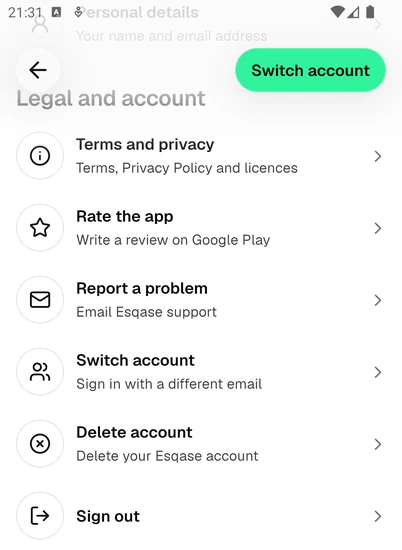
- Scroll down to Legal and account and tap Delete account.
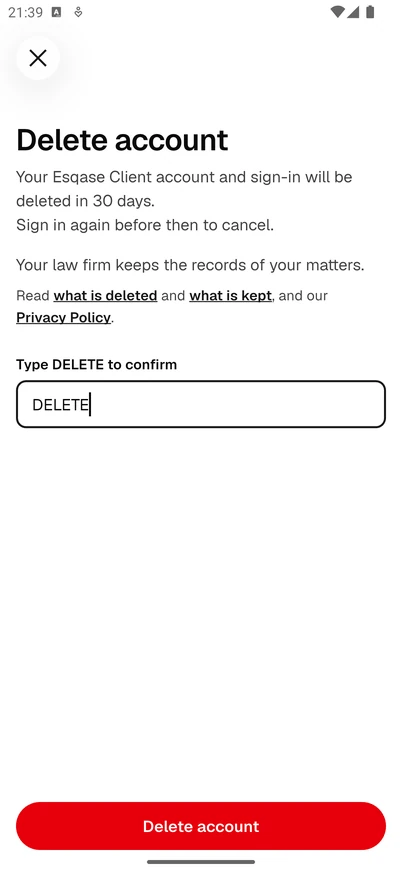
- Read the short summary. Its links open What is deleted and What your law firm keeps on this page.
- Type DELETE in Type DELETE to confirm, then tap Delete account.
- If Esqase asks you to confirm it is you, enter the 6-digit code we email you, or continue with Google or Apple.
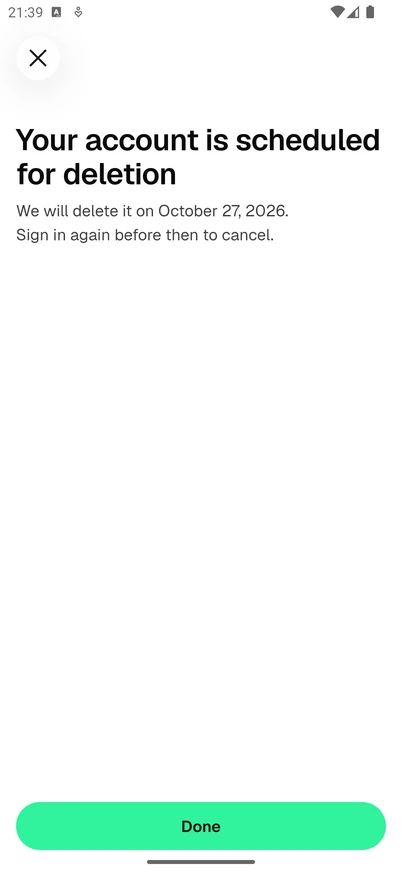
- The app shows Your account is scheduled for deletion, with the date it will happen, and we email you to confirm. Tap Done. The app signs you out, removes your account from the phone, and reminds you once of the date with Account deletion scheduled. Tap OK.
Note: If you use Sign in with Apple on an iPhone, the app may ask Apple to confirm, so it can remove Esqase from your Apple ID as well. If it cannot, it reminds you: "To finish, remove Esqase from Sign in with Apple in your Apple ID settings."
Delete your account on the web
You do not need the app for this.
- Go to client.esqase.com and sign in.
- Open your account menu at the top right and choose Settings.
- Open the Security tab. Under Danger zone, click Delete account.
- In Delete your account?, type DELETE in the box and click Delete account.
- If Esqase says "Please sign in again to delete your account.", sign in again and repeat the steps.
We email you to confirm that your account will be deleted after 30 days, and sign you out.
If you cannot sign in
Email support@esqase.com from the address on your account, with the subject "Delete my Esqase account". We will confirm by email.
What happens right away
- Your account is scheduled for permanent deletion 30 days later.
- You are signed out on every phone and every browser, and alerts to your phones stop.
- Face ID, Touch ID or fingerprint sign-in is turned off on every phone.
- We email the address on your account to confirm. From the app, the email is "Your Esqase account is scheduled for deletion", with the date. From the web, it is "Your Esqase portal account is scheduled for deletion", and says your account will be deleted after 30 days.
What is deleted
On the deletion date, 30 days after you ask, we permanently delete:
- your sign-in details, including the emailed-code sign-in and any Google or Apple sign-in you linked;
- the name, the email address and any profile picture on your Esqase account;
- your notification settings;
- the phones and browsers registered for alerts, and the record of where you were signed in;
- the keys the Esqase Client app used for Face ID, Touch ID or fingerprint sign-in.
When it is done, we email you once more: "Your Esqase account has been deleted".
Backup copies may persist for up to 90 days after deletion before being purged, as our Privacy Policy explains.
What your law firm keeps
Records your law firms hold about you stay with those firms. That includes invoices, payments, documents, signed agreements, forms you submitted, meetings, messages and the audit trail. They are part of each firm's file on your matter, and firms keep them for legal and accounting reasons. Esqase stores them on each firm's behalf.
Deleting your Esqase account does not delete them, and it is not a request to your law firm to erase anything. To ask a firm to change or erase the records it holds about you, contact that firm. If you write to us about a firm's records instead, we tell the firm and help it respond.
Changing your mind
Sign in again within the 30 days, in the app or on the web, with a code emailed to you or with Google or Apple. That cancels the deletion, and nothing is lost. The app confirms it on Home for a few seconds with "Your account deletion is cancelled."
Face ID and fingerprint sign-in are not available while a deletion is waiting, so use the emailed code, Google or Apple. Cancelling does not turn them back on. You can turn them on again under Security and privacy in the app.
Common questions
Does deleting my account delete my case file? No. Your law firm's records about your matter stay with the firm. Deleting your account removes your way in, not the file.
Will my law firm know? Your law firms cannot see whether you have an Esqase account, so deleting it does not show up on their side. If you want a firm to know, tell it yourself.
Can I use Esqase again later? Yes. After the 30 days, signing in with the same email address creates a new, empty account, and anything a law firm still shares with that address appears again.
I deleted my account by mistake. Sign in again within 30 days. The deletion is cancelled and everything is as it was.
Does uninstalling the app delete my account? No. Uninstalling removes the app from your phone. Your account stays until you delete it as described above.